Edit a meter
Last updated June 25, 2026
You can edit a meter's details directly from its Properties page or with the Actions menu.
The Actions menu for a meter has the following options:
- Edit Meter
- Change Serial Number
- Enter New Bill
- Download Meter Bills to Excel
- New Channel
- Edit Meter Import ID
- Edit Link to Emissions Source
- Delete Meter
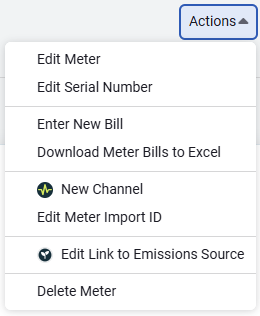
How to activate the Actions menu for the meter
- Select the meter you want to edit.
- Click the Actions menu.
Actions → Edit Meter
- When modifying a meter name the existing meter code is not updated automatically.
- When updating the postal code, when the city and state are populated they are not updated automatically. Delete these entries before entering the new postal code.
- You cannot delete a meter that is part of a chargebacks process.
Actions → Change Serial Number
- Use the Change Serial Number option to keep a history of the previous serial number. The old serial number is included when you perform a search.
- If you use Edit Meter and change the serial number the old serial number is not kept in history.
Actions → Enter New Bill
- Starts the bill entry workflow with the account of the meter populated in the search bar.
Actions → Download Meter Bills to Excel
- Creates an Excel file of all the bill details for the meter.
Actions → New Channel
- Lets you quickly create a new interval data channel for the meter.
Actions → Edit Meter Import ID
- The meter import ID can be used to import interval data.
- Some organizations read submeters in a predetermined order each month called a route.
Actions → Edit Link to Emissions Source
- Link the meter to an emissions source. Emissions records will be calculated for all the meter's bills. Only unlinked emissions sources with the same type (commodity) can be linked. Requires the Emissions module.
Actions → Delete Meter
- This option deletes the meter and all bills on the meter.
Make a meter inactive
- You can mark a meter or an account as inactive.
- Inactive meters or accounts may not appear in the tree, depending on your settings in the Sites and Meters module menu.
- Bills can still be entered on an inactive meter, while the account is active.
- When a meter or account service ends on a known date, you can End the Relationship with an effective end date. Use inactivation when a meter is being retired from tracking.
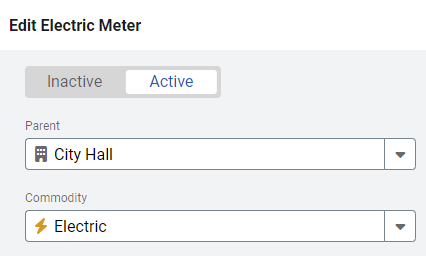
Results of marking a meter inactive
- If a meter is linked to Portfolio Manager and you mark it inactive, the Portfolio Manager link is removed.
- Bills from an inactive meter are still included in charts and reports.
- Inactive meters are included in your total meter count.
Frequently asked
How do I record cost but not usage on an existing meter?
If a meter should track cost but not usage, enter the bill without a use line, or set the use line to 0. Don't use the chargebacks Bill calculation Fixed amount setting—that applies only to calculated meters. If the meter never has usage at all, consider whether you actually want a meter for this charge or an account charge instead.