Bill Capture problematic scans
Last updated May 15, 2026
If the Scanning Guidelines are not followed, then incorrectly scanned files are not processed. They are removed from the batch and emailed to you as a Problematic Scan notice.
The problematic scans email includes the incorrectly scanned document(s) and:
- The Bill Capture batch code for the documents.
- The batch code is an EnergyCAP code and does not directly match the name of the zip file submitted by your organization. The original zip file can be found in the batches section.
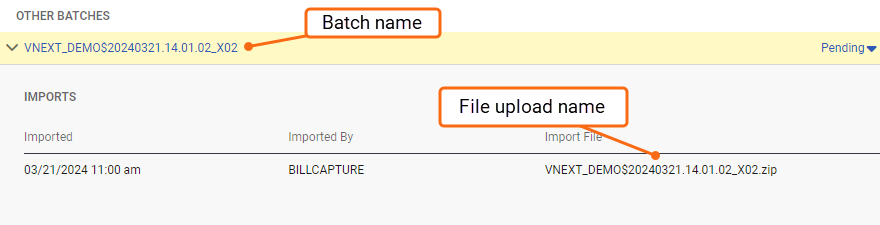
- The batch code is an EnergyCAP code and does not directly match the name of the zip file submitted by your organization. The original zip file can be found in the batches section.
- An error explanation for the rejection.
- For instance, if a bill is uploaded with missing pages, you might see the message: “Please send all pages for processing.”
You also see the following instructions:
- If you want the attached document to be processed, upload the entire document in a new batch and fix identified errors.
- If other files were uploaded in this batch, and they are not included in this email or any other Problematic Scan notice, they have been processed and should not be uploaded again.
Batches left processing because of problematic scans
If you upload a batch with only incorrectly scanned documents (all documents in the batch are rejected as Problematic Scans), the status of this batch remains Processing, because there is nothing to process. If you want any batches of this nature to be removed from your Bill Capture upload history, please submit a support ticket through the Resource Center in the application.
Considerations for summary bills and multi-bill PDF files
If only a portion of a multi-bill PDF or summary bill is rejected, then the Problematic Scan notice you receive contains only these specific, rejected bills, and the bills that were not rejected are processed.
Do not upload the entire multi-bill PDF or summary bill again when only a portion is rejected. Only upload the bills specified in the email. Uploading the entire multi-bill PDF or summary bill a second time results in duplicate bills in EnergyCAP.