April 15, 2026
Published April 16, 2026
Enhancement to Bill Capture upload processing
We’ve enhanced the Bill CAPture upload process to improve how unprocessable files are identified and managed.
When a batch is uploaded, the system now automatically detects password-encrypted files, corrupt files, and unsupported file types. These issues are surfaced immediately, reducing the need for manual investigation.
A new Problem Files tab provides a centralized place to review and take action on these files. Each issue includes a detailed audit trail, giving full visibility into what happened and what actions were taken.
Available actions vary based on the issue and may include replacing the file, removing the file, or continuing processing.
Within the Problem Files area, files are organized into two sections: Actions Needed, where you can quickly address outstanding issues, and Action Taken History, which tracks previously resolved items.
Reduce audit noise
Commodities that are not delivered at regular intervals—such as propane or kerosene—can sometimes be incorrectly flagged by standard bill audits (for example, overlapping bills, gaps between bills, or multiple bills within a billing period).

With this release, we’ve added greater flexibility to these audits. For single-commodity accounts using select irregular-delivery commodities, the following audits will now be automatically skipped:
- Overlapping Bills
- Gap Between Bills
- Multiple Bills in Billing Period
This helps reduce unnecessary flags and improves audit accuracy for these use cases.
Audit settings remain fully configurable, and users can adjust them at any time to meet their organization’s needs.
Demand and Trend Insights dashboard widgets
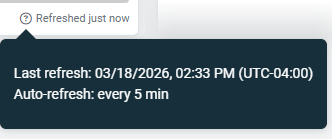
The Demand and Trend Insights widgets are no longer static, they update every five minutes. A timestamp in the bottom right of each widget shows when the data was last refreshed. Hover over the popover to see when the last update was. Filters and setup remain the same.